Mile Marker TX
I-20 473.0For over-the-road fleets and dispatchers running Texas

Know where every truck broke down.

The interstate and mile marker to the tenth, the direction and the county, in one tap. Your fleet on one map, and a file on every yard and dock. Texas only.

Request a fleet demo
MM 0A breakdown

From the shoulder to road service.

One breakdown on I-20 in Dallas, start to finish. Real screens from the app, sample data.

  1. 1

    A truck breaks down

    Westbound I-20 in south Dallas, on the shoulder, between exits.

  2. 2

    The driver taps Copy

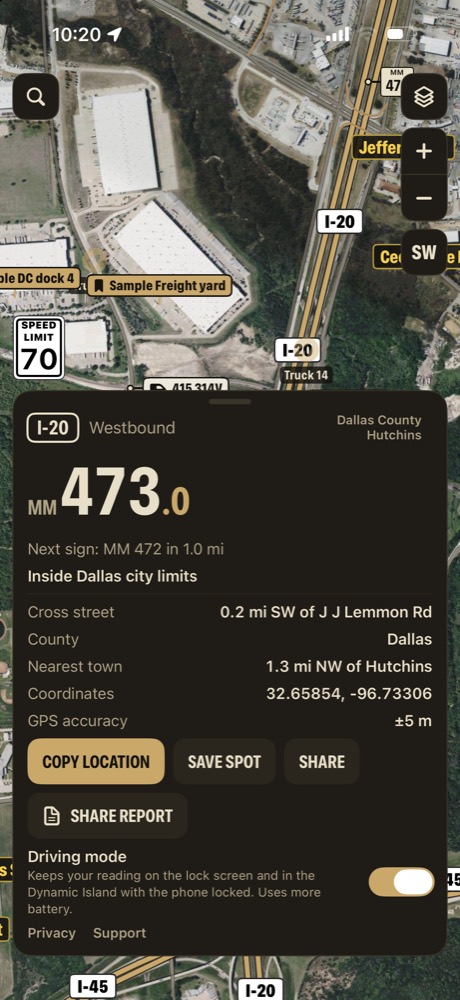
    "Westbound I-20, mile marker 473.0, about 1.3 miles NW of Hutchins, Dallas County."

  3. 3

    Dispatch calls road service

    With the marker, direction and county, not "somewhere past the interchange."

  4. 4

    The fleet on one map

    Every truck that's sharing, with its name, so dispatch can see who's closest.

  5. 5

    Yards and docks keep a file

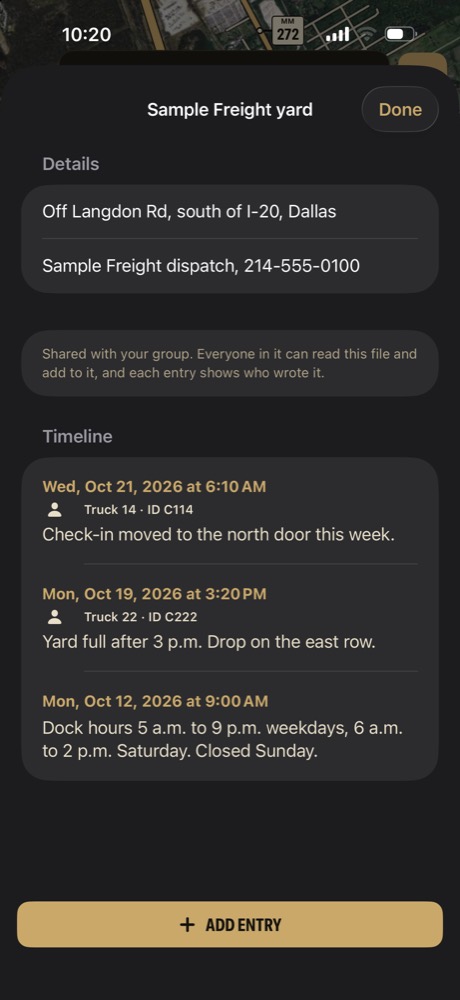
    Dock hours, check-in notes, who said what and when, on the yard's pin.

MM 1Breakdowns

The mile marker, not a guess.

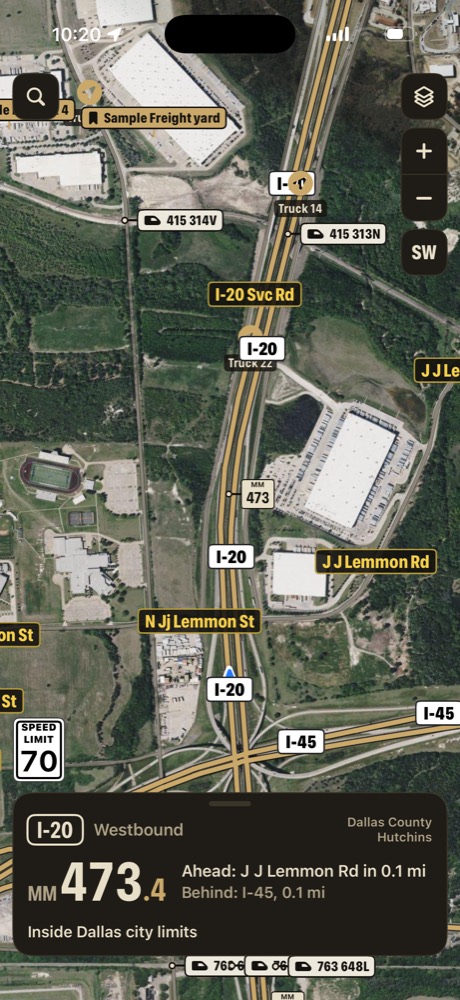
On the shoulder of I-20 in south Dallas, the card already knows the marker, the direction and the county.

  • Interstate or highway, mile marker to the tenth and direction of travel
  • The next exit road ahead and the last one behind
  • County and city limits, and the nearest 911 address
  • One tap copies a line the driver can text to dispatch
What the driver's Copy gave dispatch
"Westbound I-20, mile marker 473.0, about 1.3 miles NW of Hutchins, Dallas County."
I-20 westbound at mile marker 473.4 in Dallas, ahead J J Lemmon Rd, behind I-45, inside Dallas city limitsThe location card on I-20 westbound at mile marker 473.0, Dallas County, with Copy location and Share report
MM 2Your fleet

Every truck, on one map.

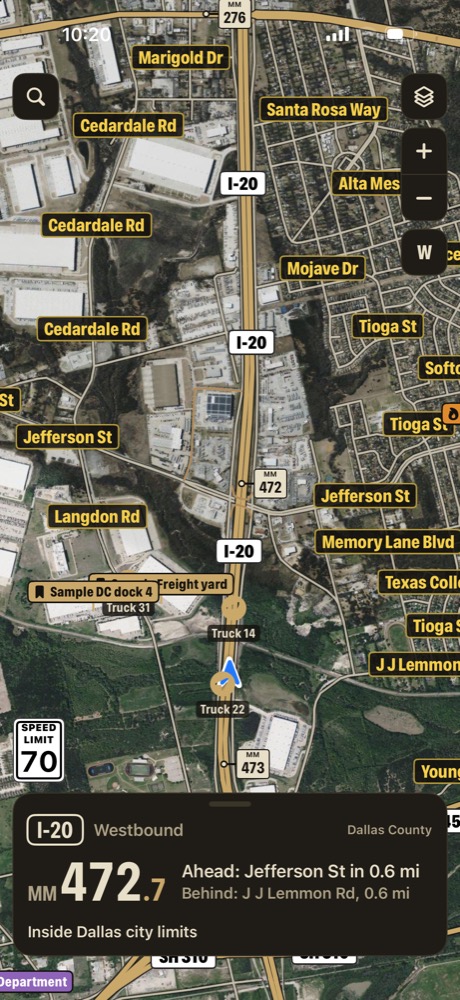
Trucks 14 and 22 on I-20, Truck 31 at the yard off Langdon Road. See who's closest before you make the call.

  • Every truck that's sharing, with its name, on one map
  • Send a pin to one driver, or to the whole fleet
  • Drivers show only while Share my location is on, and updates need signal
  • No location history. Positions older than 15 minutes are hidden
Sample data shown
Trucks 14 and 22 on I-20 westbound and Truck 31 at the yard in south Dallas, with the Sample Freight yard and Sample DC dock 4 pins, inside Dallas city limits
MM 3Yards and docks

Every dock keeps a file.

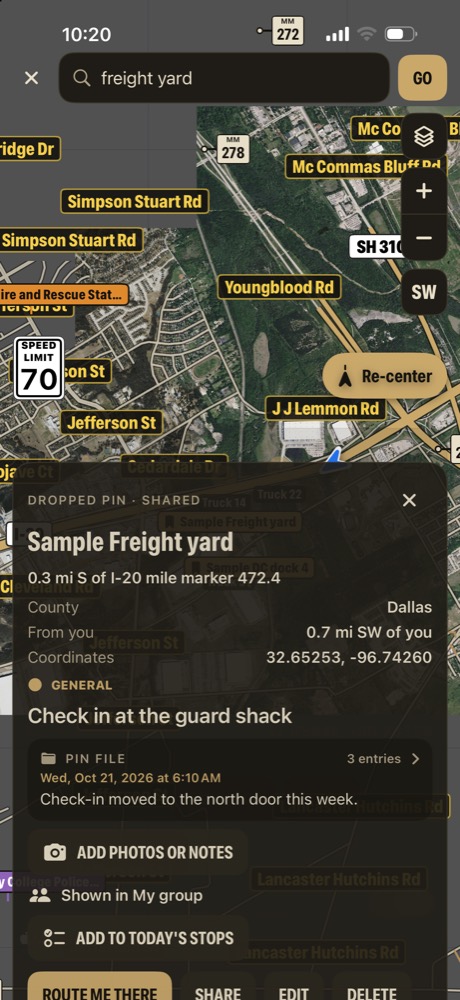
Dock hours, where to check in, and when the yard fills up, written by the drivers who were there.

  • Pin your yards, customer docks and drop lots
  • Each keeps a file: contact, dock hours and dated driver notes
  • "Check-in moved to the north door this week." Shared with every driver
  • Today's stops: check off each one, and route to the next

Don't put gate codes or confidential customer information in a pin file.

Sample data shown
The Sample Freight yard pin, 0.3 mi south of I-20 mile marker 472.4, Check in at the guard shackThe Sample Freight yard file: Sample Freight dispatch contact, Truck 14 notes check-in moved to the north door, Truck 22 notes the yard is full after 3 p.m., and dock hours
MM +Also in the app

And the rest of it.

Every copy of Mile Marker TX has these too.

  • Driving mode

    The road and mile marker on the lock screen and in the Dynamic Island.

  • Silent turn alerts

    A quiet alert before each turn and a tap on Apple Watch.

  • Night mode

    Dims the map and turns the card red for night runs.

  • Works with no signal

    Mile markers, addresses and the offline map in the regions you download.

  • Emergency places

    Hospitals, rail crossings, fire and police on the map.

  • Any coordinates

    Paste coordinates or a map link from a customer, and it finds the spot.

MM ?Questions

Straight answers.

More on the support page, or email support@milemarkertx.com.

Does it route trucks?

No. Mile Marker TX has no truck routing, and it doesn't know bridge heights, weight limits or hazmat restrictions. Use your truck routing and your company's rules for that.

Does it work outside Texas?

Only Texas. Mile markers, county roads, 911 addresses and landowner records cover all 254 Texas counties. Outside Texas the app shows Apple's map and your position, and that's all.

Is it an ELD, a load tracker or a dispatch system?

No. It doesn't log hours, track loads, send ETAs to customers or connect to your TMS. It tells a driver and dispatcher exactly where a truck is in Texas, and keeps notes on the places you go.

Who can see the fleet?

Only phones that enter the same share code, and only while each driver has Share my location on. Updates need signal, there's no location history, and positions older than 15 minutes are hidden.

Does it work with no signal?

Yes, in the regions you download: the mile marker reading, 911 addresses and the offline map. Sharing and satellite view need signal.

What will it cost?

Mile Marker TX will be free to download. Accounts and paid features are planned for later.

MM DEMO

Request a fleet demo

We'll show you mile marker breakdown calls, your fleet on one map, and files on yards and docks, using sample data.

Mile Marker TX is coming soon for iPhone. This registers your interest. It isn't a contract or a commitment.

Please don't include gate codes or confidential customer information. We use these details only to reply to you. Privacy

MM TX

Know where every truck broke down.
Anywhere in Texas.
Coming soon for iPhone. Free to download.

Questions? support@milemarkertx.com

Mile Marker TXComing soon for iPhone
Notify me